Online restart
Sometimes you may need to upgrade Odyssey binary or make some changes in config, that is not reloaded with SIGHUP.
The main idea is to do this without downtime with two Odyssey instances: the first will serve all the current connections, while the second will accept all new connections.
Odyssey have several ways to perform online restart. The way of perftorming it depends on version you use.
Since 1.5.0
At version 1.5.0 nginx-like way of performing online restart was introduced. It follows the next scheme: 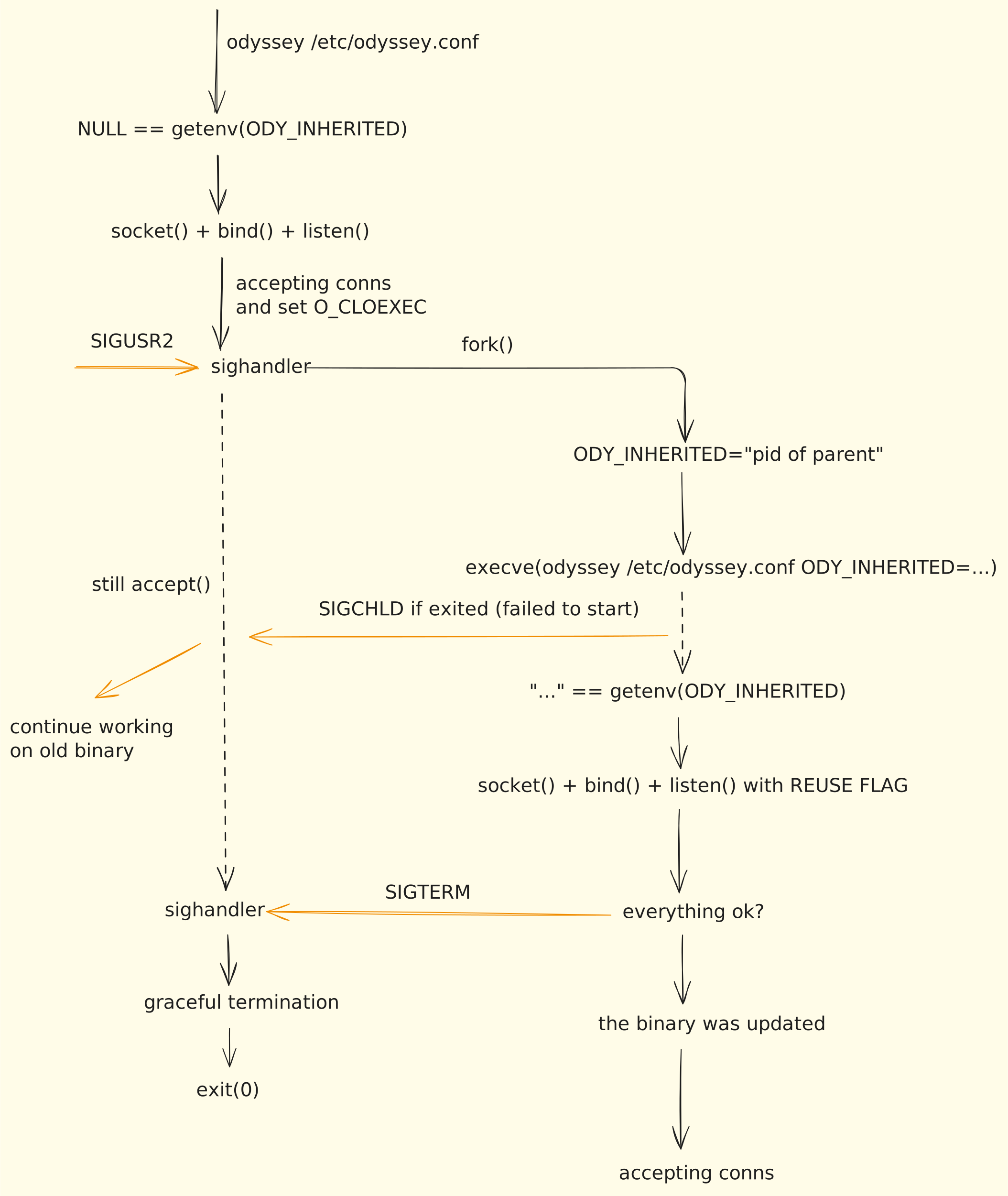
Thus, to perform online restart you will simply need:
- enable reuse port for accepting from two instances: bindwith_reuseport
- send
SIGUSR2to Odyssey instance, ex.:kill -sUSR2 $(pidof odyssey)
SystemD configuration
You will need Odyssey build vs libsystemd-dev. On ubuntu you can install it with
When running Odyssey under systemd, the service type must be configured correctly for online restart to work:
Recommended: Use Type=notify with systemd notify support.
The online restart mechanism uses fork() + execve() to spawn a new process that replaces the parent. With Type=notify, Odyssey explicitly tells systemd about the new main process PID, allowing seamless handoff during online restart.
Example systemd service configuration:
[Service]
Type=notify
NotifyAccess=all
ExecStart=/usr/bin/odyssey /etc/odyssey/odyssey.conf
Restart=on-failure
Alternative (for older Odyssey versions without systemd notify support): Use a wrapper script with Type=simple:
#!/bin/bash
# /usr/local/bin/odyssey-wrapper.sh
/usr/bin/odyssey /etc/odyssey/odyssey.conf &
ODYSSEY_PID=$!

# Keep wrapper alive, track any odyssey process
while kill -0 $ODYSSEY_PID 2>/dev/null || pgrep -x odyssey >/dev/null; do
    sleep 5
done
Then configure systemd:
Note: Unix domain sockets do not support SO_REUSEPORT and cannot be shared between parent and child processes. For online restart to work, you must either: - Use only TCP sockets (recommended), or - Remove Unix socket listeners from your configuration
Disabling online restart
If you don't want Odyssey to perform online restart on SIGUSR2, you can disable this feature with enable_online_restart.
Dropping old connection
It is possible to control connections dropping on old Odyssey instance.
By default, one connection per second for each worker thread will be dropped between transaction blocks. But if you want to disable it and allow all the connections to work until disconnection, you can set drop_enabled option to no:
On 1.3, 1.4, 1.4.1
There is enable_online_restart feature.
Enabling it to yes will make Odyssey to watch if there is new another instance of Odyssey by getting lock files at locks_dir.
When a new Odyssey instance is run, an old performs graceful termination. But you need to run a new version manually. You will also need enabled bindwith_reuseport.